🚧 Non-English content included
The translation of the picture is still in progress, and some content may not in English yet.
GUI API
UltiTools offers the GUI API of obliviate-invs, so you can easily develop GUI plugins without worrying about the implementation details of GUI.
Thanks for the open source project form Hamza Coşkun obliviate-invs
UltiTools-API provides two pre-made GUIs at the moment:
Paging Page PagingPage and Confirm Page OkCancelPage
Create a GUI
Here I use PagingPage as an example.
What I want to create is a 3-row GUI, the last row is the paging navigation bar, the first two rows display the content, click the content to execute the command. As shown in the figure below:
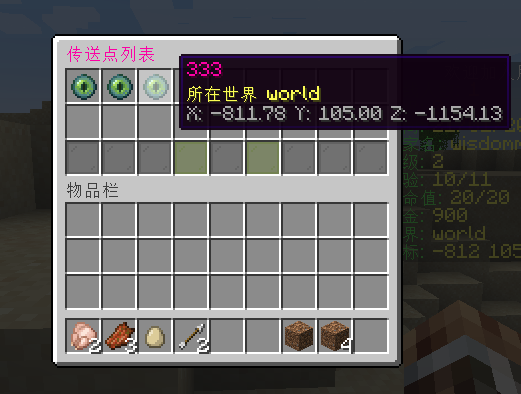
Firstly, you need to create a GUI class that inherits PagingPage.
java
public class WarpGui extends PagingPage {
    // new a WarpService, just for example, not necessary
    private final WarpService warpService = new WarpService();

    // You need to override a constructor to pass parameters, the Player parameter here is required
    public WarpGui(Player player) {
        super(
                // player who opens the GUI
                player,
                // ID of the GUI, you can set it to any string
                "Warp-list",
                // Title of the GUI
                Component.text(BasicFunctions.getInstance().i18n("Warp list"))
                        .color(TextColor.color(0xFF00A6)),
                // Number of rows of the GUI
                3
        );
    }

    // Override this method to set the content of the GUI
    @Override
    public List<Icon> setAllItems() {
        List<Icon> icons = new ArrayList<>();
        List<WarpData> allWarps = warpService.getAllWarps();
        for (WarpData warpData : allWarps) {
            Location location = WarpService.toLocation(warpData.getLocation());
            Icon icon = new Icon(UltiTools.getInstance().getVersionWrapper().getEndEye());
            TextComponent textComponent = Component.text(warpData.getName()).color(TextColor.color(0xFF00A6));
            icon.toComp().setName(textComponent);
            String world = String.format(ChatColor.YELLOW + BasicFunctions.getInstance().i18n("World %s"), location.getWorld().getName());
            String xyz = String.format(ChatColor.GRAY + "X: %.2f Y: %.2f Z: %.2f", location.getX(), location.getY(), location.getZ());
            icon.setLore(world, xyz);
            // Icon click event
            icon.onClick((e) -> {
                player.performCommand("warp tp " + warpData.getName());
                player.closeInventory();
            });
            icons.add(icon);
        }
        return icons;
    }
}
Then call this GUI class in your command executor.
java
@CmdTarget(CmdTarget.CmdTargetType.PLAYER)
@CmdExecutor(alias = {"warp"}, manualRegister = true, permission = "ultikits.tools.command.warp", description = "Warp Function")
public class WarpCommands extends AbstractCommendExecutor {

    @CmdMapping(format = "list")
    public void listWarps(@CmdSender Player player) {
        WarpGui warpGui = new WarpGui(player);
        warpGui.open();
    }

}
For more GUI API usage, please refer to obliviate-invs Wiki
 Ling Bao